What needs following up today?
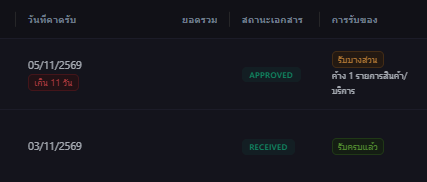 PO table · Compare due dates and receipt status
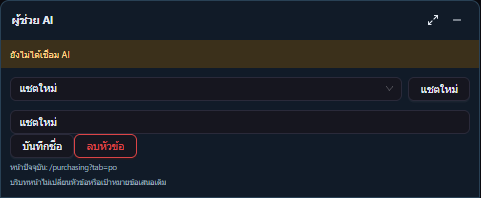 AI assistant · Beside the records under review
The purchasing screen shows one outstanding PO, one partially received PO and one overdue PO. A single order can appear in all three counts. Each tile counts documents, not individual units.
Purchasing starts with the partially received order and checks the balance on each line. Warehouse staff confirm what actually arrived. Sales or production can then decide whether to wait for the next delivery.
Automotive parts example · An order for 100 washers
Ordered 100 · Received 60 · Outstanding 40
Purchasing · Order 100 units
Issue a PO with the item, quantity and expected delivery date so receiving staff can match the shipment to the order.
Follow up with the supplier on the 40 outstanding units.
Warehouse · Count 60 units
Check the delivery note and record the 60 units received against the original PO line. If inspection is required, separate the units awaiting inspection before confirming availability.
Sales · Agree on a shipment
Check the quantity available after reservations, then agree with the customer on a split shipment or a later delivery in full.
Production and assembly · Choose a run
Compare available components with the quantity required per assembly. At two units per assembly, this delivery can cover at most 30 assemblies. Check the other components before scheduling the run.
ERP finance · Confirm the batch for the period
Trace the supplier invoice (AP-INV) by its source document number. If payment comes later, trace the supplier payment (AP-PAY) in the period when it is recorded. Batches can also include customer invoices, customer receipts and withholding tax entries as those events occur.
Accounting · Check what the batch receipt acknowledges
Open the receipt for the linked company. Match the batch ID, period and version to the batch finance confirmed. Find the supplier invoice in the receipt, check that all expected documents were accepted, then reconcile the entries against the general ledger.
In testing, resending the same batch returned the original receipt and left balances unchanged.
An AI assistant inside the ERP for every department
Warehouse
Ask AI · Which purchase order line records the 60 units received?
Next step · Open the referenced PO line, check the delivery note against the physical count and record only the 60 received.
Purchasing
Ask AI · Which supplier should we contact about the 40 still due?
Next step · Use the 40-unit balance to request the next delivery date from the supplier and share the confirmed date.
Quality control
Ask AI · Which lots from this delivery are awaiting inspection?
Next step · Open the lots awaiting inspection, check them against the acceptance criteria and tell the warehouse which lots can be issued.
Production and assembly
Ask AI · Given the materials available to issue, which components are still missing for this run?
Next step · Compare available components with the requirement per assembly and schedule a run with a complete set.
Sales and dispatch
Ask AI · After existing reservations, how many units can we ship today?
Next step · Verify available stock with the warehouse and agree with the customer on a split shipment or a later full delivery.
Finance and accounting
Ask AI · Which receipt confirms that accounting accepted our batch?
Next step · Match the finance batch to its acknowledgment and follow up on any batch still missing one.
Management
Ask AI · Which orders could ship late because of this shortage, and who should follow up first?
Next step · Prioritize affected orders and assign an owner to follow up on each shortage.
These examples illustrate the intended role of AI in each department. ERP read access has been tested. End-to-end chat workflows through transaction entry still require verification.
Send a finance batch to Accounting System with AI Assistance
The ERP groups financial entries into a batch. Accounting accepts the batch for the linked company and can use its receipt number to trace which batch was received.
In QA with simulated records, resubmitting the same batch returned the original receipt number and left general ledger balances unchanged. This result covers the tested QA workflow.